User Activity Audit
As an Organization Administrator, you can analyze the activity of ThreatStream users in your organization through audit logs and gain crucial insight into the history of different user actions, ensuring transparency, traceability, compliance, reporting, and accountability for every action initiated by API clients, users, or automated processes. You can audit activity of ThreatStream users on the Audit page in ThreatStream Setting or in the audit lookup table. See Audit Lookup Table (ThreatStream) for more information on the audit lookup table.
Note: ThreatStream MCP user activity can only be audited in the audit lookup table. See Audit Lookup Table (ThreatStream) for more information.The Audit page enables Org Admins to view user audit logs for both ThreatStream user interface activity and API activity.
(Click the image to enlarge it)
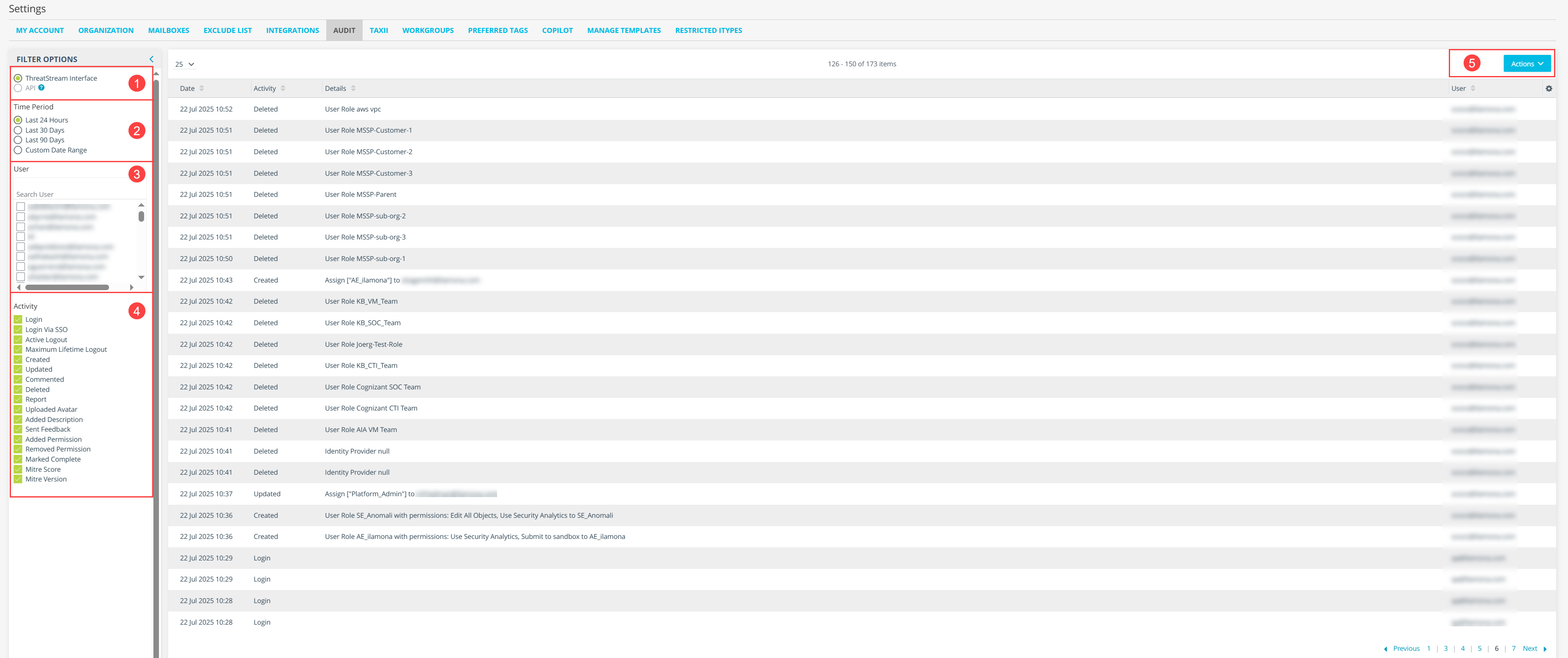
Toggle ThreatStream Interface or API
Time Period
User list
Activity list
Export audit log
Audit Log Activities
Audit logs are maintained for the following ThreatStream UI activities.
Activty Description Login Logged in by specifying user name and password. Login Via SSO Logged in using SSO. Active Logout Logged out by clicking the Logout link. Maximum Lifetime Logout Logged out by the system when the Maximum Lifetime Logout time limit was reached. Created Created the specified object. Updated Updated the specified object. Commented Added a comment to the specified object configuration. Deleted Deleted the specified object. Report PDF Report creation activity. Click Exported in the Activity column to display a pop-up information box with details. In the information box, under Export Type:
Download indicates that the user created and downloaded the report from a Threat Model entities detail page.
Email indicates that the user created the report through the Share via Email feature. When Email is listed, the emails to which reports were sent are listed under Recipients.
Uploaded Avatar Uploaded an avatar to the user's own Profile page. Added Description Added or modified the Summary text on the user's own Profile page. Sent Feedback Sent feedback. The feedback link is a question mark (?) icon that is visible when the gamification permission is enabled. Added Permission Granted a user permission on the Settings > User Admin page. Removed Permission Removed a user permission on the Settings > User Admin page. Marked Complete Marked an intelligence initiative as complete. Mitre Score Updated the MITRE ATT&CK Security Control Framework for your organization. Click Mitre Score Update in the Activity column to display a pop-up information box with details. Information includes the Name of the TTP modified, timestamp of the action, New Score (security coverage score assigned to the TTP by the user), and Old Score (previous security coverage score). Mitre Version Updated the MIRE ATT&CK version on the Settings > Organization page. Audit logs are maintained for all API requests. The following table describes API audit log columns.
Column Description Date Timestamp the API request was received. Method HTTP method. Endpoint Endpoint URI requested. User Agent User-agent request header for the API request. User User that sent the request. Creating a ThreatStream Audit Log Report
By default, the Audit page shows logs for all activities for the logged in users for the last 24 hours.
To create a ThreatStream Interface user audit log report based on filters you specify:
- In the bottom-left corner of the side navigation panel, click
> ThreatStream and then click Audit.
- Select the ThreatStream Interface audit log option.
- Select a time period:
- Last 24 Hours
- Last 30 Days
- Last 90 Days
- Custom Date Range
If you select this option, use the date selector to complete the time period filter. You can specify a range within the last 90 days.- Select one or more users in the User list. You can find users by scrolling the list or by searching.
- Select one or more activities from the Activity list.
- The audit table displayed on the page is updated instantly whenever you change a filter option.
To export audit log report based on the filters selected, click Actions and select Export to export the audit log information to a CSV file.
Note: The export file includes the columns and data displayed on the Audit page. It does not include linked information.
Creating an API Audit Log Report
You cannot select activities for the API audit log report. This report displays all API calls for up to 10 users.
To create an API audit log report:
- In the bottom-left corner of the side navigation panel, click
- Select a time period:
- Last 24 Hours
- Last 30 Days
- Last 90 Days
- Custom Date Range
If you select this option, use the date selector to complete the time period filter. You can specify a range within the last 90 days.
- Select at least 1 and no more than 10 users from the User list. You can find users by scrolling the list or searching.
- Select the API audit log option. The API audit log list is displayed for the selected users.
To export API audit log report based on the filters selected, click Actions and select Export to CSV to export the API audit log information to a CSV file.